Planning closures
Tell families when your center is closed: public holidays are built in, and you add your own days off.
Where to find it
In the left menu, under Daily care, click Closures. Only directors see this page.
The page has two parts:
- Center closures: the days off you add yourself, with a form to add a new one.
- Public holidays: the public holidays of the next 12 months, filled in for you.
Families see both in the Hi Kiddo app.
Public holidays
You don't need to add public holidays. Hi Kiddo lists them automatically for the next 12 months, such as New Year's Day, Labour Day, Throne Day, Green March, Independence Day, Eid al-Fitr and Eid al-Adha.
Religious holidays follow the moon sighting, so their dates are estimates. They carry an estimated date badge. If the real date turns out different, or if your center stays open on a public holiday, let families know with a message or a notification.
You can't edit or remove public holidays.
How to add a closure
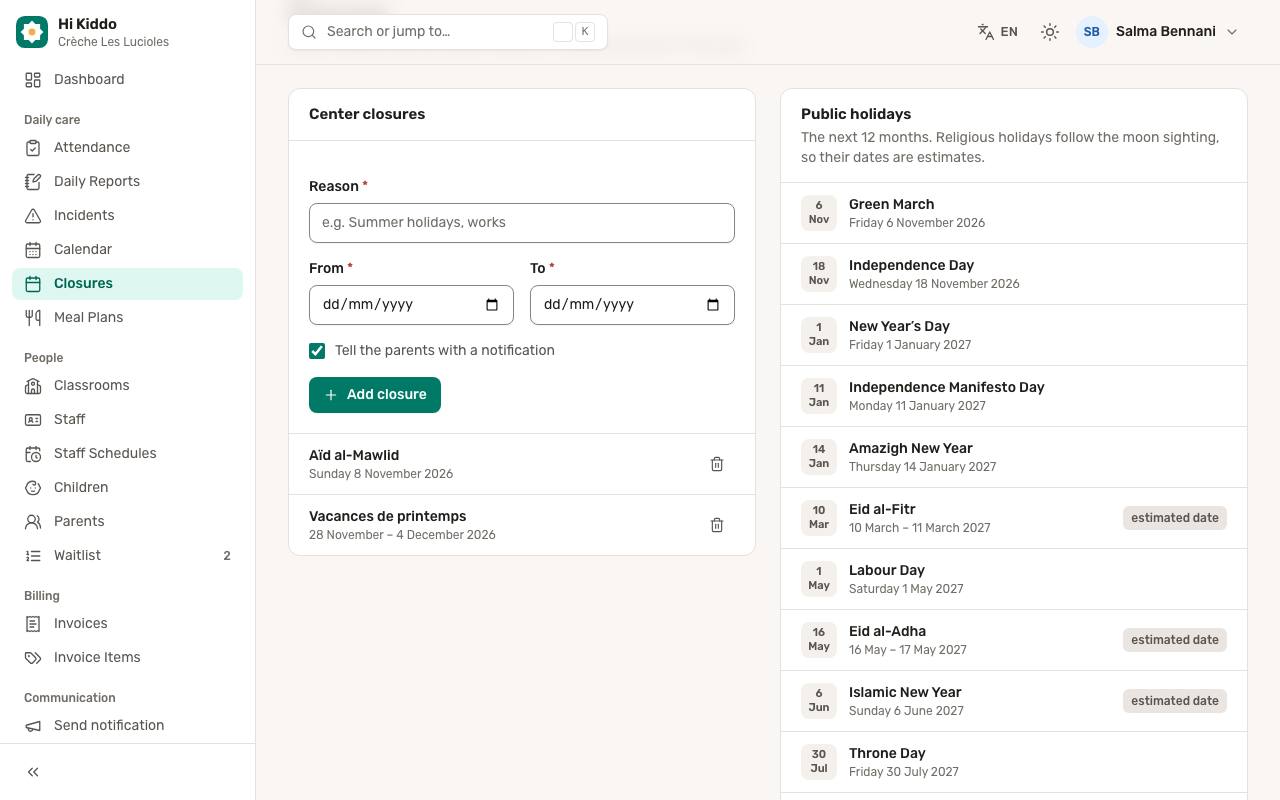
- In Center closures, fill in the Reason, for example "Summer holidays" or "Works".
- Choose the first day closed in From.
- Choose the last day closed in To. For a single day, pick the same date in both.
- Keep Tell the parents with a notification ticked to send a push notification to the parents, or untick it to add the closure quietly.
- Click Add closure.
A message confirms "Closure added" with its reason, and it appears in the list in date order.
The first day must be today or later, and the last day can't be before the first.
What parents receive
When you leave Tell the parents with a notification ticked, every active parent account in your center gets a push notification on their phone, in their own language. The title says your center is closed, and the text gives the reason and the dates, for example "Summer holidays: closed from 1 August to 31 August."
Parents only receive it if they have signed in to the Hi Kiddo app on their phone and allowed notifications.
How to remove a closure
- In Center closures, click Delete next to the closure.
- Confirm.
Families no longer see it in the app. Removing a closure does not send a notification, so tell families yourself if plans change.
Good to know
- Only upcoming closures are listed. Once a closure's last day has passed, it no longer shows.
- Closures are for information: they show families when you are closed. They don't change attendance, invoices or staff schedules.
- For your regular weekly hours (for example closed on Saturdays), use the Opening hours in Center settings instead.
- To share a closure as an event in the calendar too, see Calendar events. To send any other message to families, see Send a notification.
Troubleshooting
I can't pick a date in the past. Closures are for the days ahead. The first day must be today or later.
A parent didn't get the notification. Check that their account is active and that they have signed in to the app on their phone. Parents with notifications turned off still see the closure when they open the app.
I added a closure by mistake. Delete it. If you had ticked the notification, parents already received it, so send a short correction.